Your account and the market dashboard
3 min read
After you sign in you land on the live market dashboard — the home base for everything on MarketsEasy. Here is how the interface is laid out so you can find any feature fast.
The top navigation
The navbar groups everything into a few menus. Market data (indices, news, dashboard) sits on the left; the derivatives tools (option chain, OI tracker, screener, max pain) and the AI tools live under their own dropdowns. Your profile picture in the top-right opens the user menu.
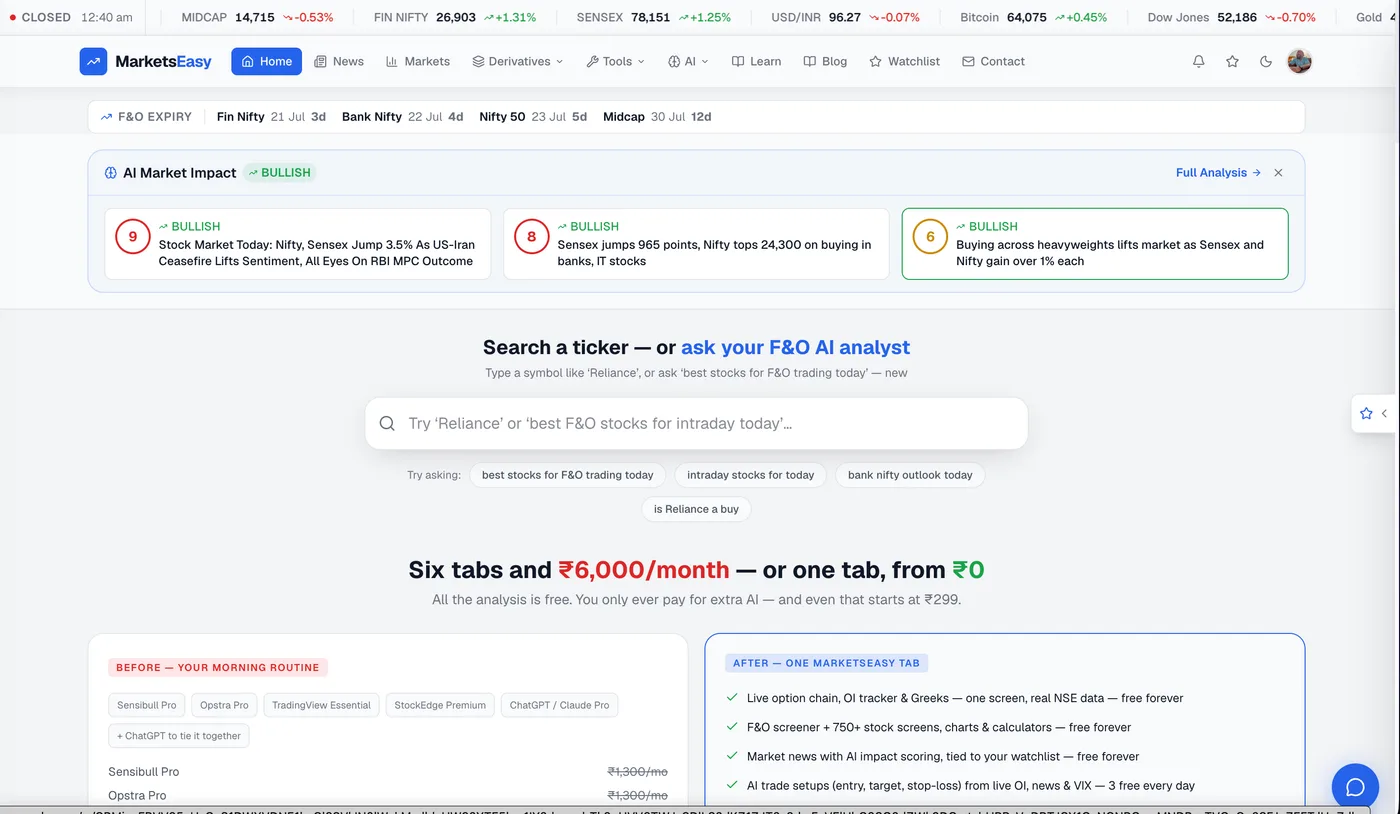
The market bar
Along the top of most pages you will see live levels for Nifty 50, Sensex, Bank Nifty, Fin Nifty and India VIX. These refresh automatically during market hours, so you always have the headline numbers in view no matter which tool you are using.
The user menu
Click your profile picture in the top-right to open the user menu. From there you can:
- Open your Watchlist
- Go to Billing & plan to see your current pass and AI usage
- Toggle dark / light theme
- Turn the daily email digest on or off
- Reach Pricing and Help & contact
Prefer dark mode? Toggle it from the user menu — your choice is remembered on this device for every visit.
Finding a tool quickly
Every major tool has its own page: the option chain, OI tracker, F&O screener, AI Trading Assistant, Ask MarketsEasy, market dashboard and the calculators. The guides in the Using Each Feature section walk through each one step by step.
Jump to the market dashboard
Live indices, sectors, FII/DII flows, VIX and global cues in one view.